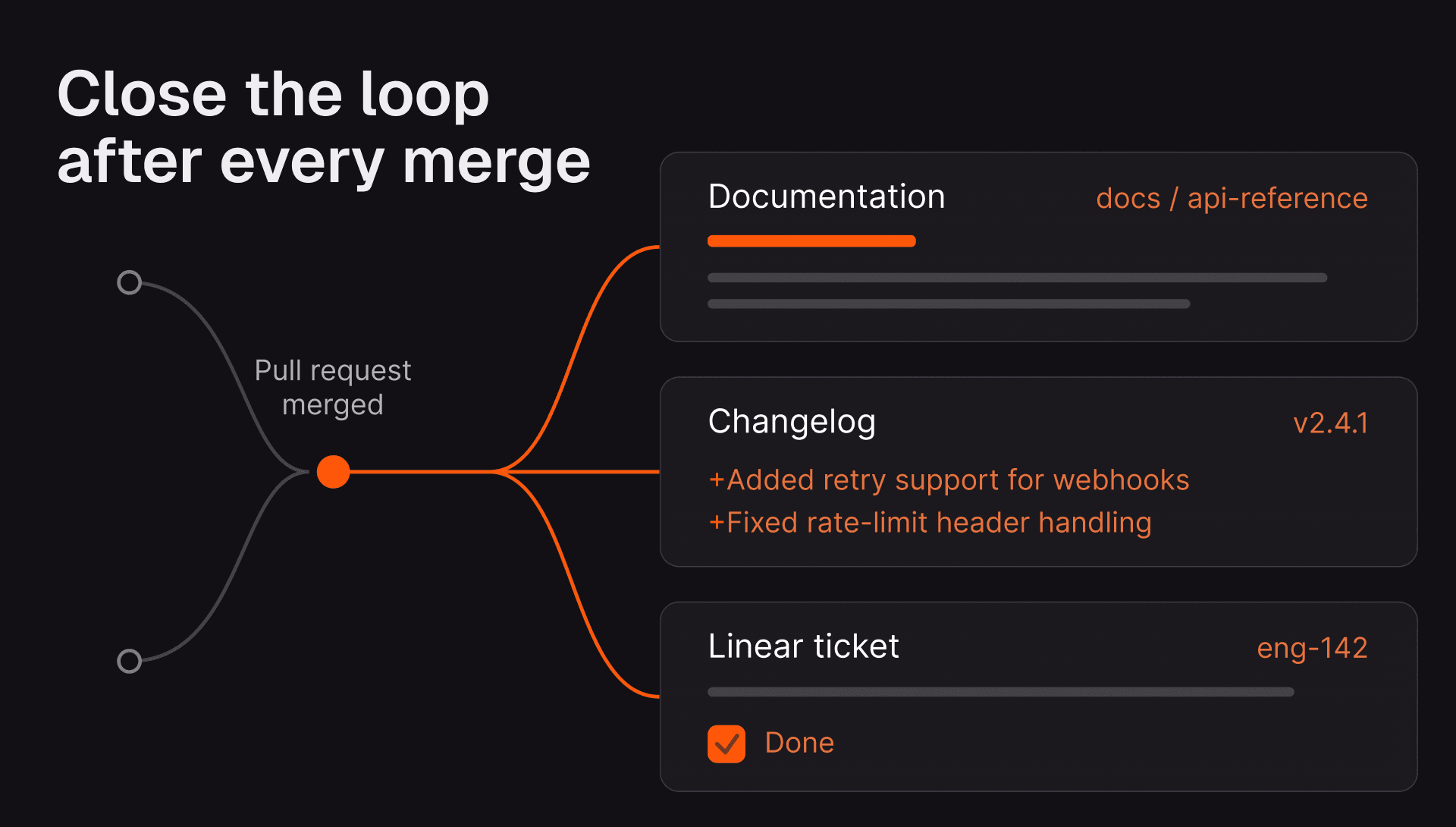
After a pull request merges, a team may still need to write the changelog entry, update the right documentation section, or create a follow-up ticket for work that did not belong in the original change. By then, the context behind the decision can be harder to reconstruct.
Some follow-through is mechanical: a linked ticket can close, a version can bump, or a notification can send. Other work depends on understanding what the pull request changed and whether that change is worth documenting, communicating, or tracking.
Post-Merge Actions give the CodeRabbit agent that context. They run after a pull request is merged to the default branch and can carry the change through the work that follows.
What happens after merge
Post-Merge Actions are custom automations that CodeRabbit evaluates during the pull-request review. Before merge, every enabled action appears in the CodeRabbit walkthrough as a checkbox. Applicable actions are checked; actions that do not apply, or whose applicability is unclear, remain unchecked. Authors and reviewers can also opt out of an action before merging.
After the pull request merges, CodeRabbit runs the checked actions and posts a single result comment on that merged pull request. The comment records each action's outcome and includes details about any follow-up output.
Post-Merge Actions are the merge-time counterpart to Pre-Merge Checks. Pre-Merge Checks evaluate requirements before a change lands; Post-Merge Actions use the same pull-request context for follow-through after it merges. Admins can configure actions at the organization or repository level.
What an action can do
Each action uses a prompt to decide whether it applies and what it should do. Its output can take one of three forms:
- Code changes: CodeRabbit edits or creates files and opens a follow-up
pull request against the default branch. For example, it can update an entry
in the Unreleased section of
CHANGELOG.mdafter a user-facing change. - A text report: CodeRabbit writes a free-form summary directly in the result comment on the merged pull request.
- An integration action: CodeRabbit uses a connected MCP tool to create a ticket, open an issue, or post a notification in the system where that follow-up belongs.
Follow-up pull requests created by code-change actions do not start another round of Post-Merge Actions when they merge. That keeps the workflow reviewable and prevents accidental recursion.
What it feels like in a pull request
The workflow starts where engineering work already happens. CodeRabbit reviews the pull request, then surfaces the actions that are relevant to that specific change in the walkthrough. A documentation action might be checked for a new public feature, but remain unchecked for an internal refactor. A release notification might be checked only when files in a product area changed.
That decision happens before merge, when the author and reviewers can still see the complete context. They can keep an action selected, clear it, or skip a specific action with a chat command. The result is a deliberate handoff from review to follow-through, rather than a background job that runs on every merged pull request.
Set up an action
You can configure Post-Merge Actions in CodeRabbit settings at the organization
or repository level, or version them in .coderabbit.yaml. Each action has a
name, an enabled state, and a natural-language prompt.
The prompt is the operating policy. It should say what to inspect, what to change or create, and when to do nothing. Specific instructions make actions more useful and less noisy.
reviews:
  post_merge_actions:
    - name: "Update changelog"
      enabled: true
      prompt: "If this PR contains user-facing changes, append a concise entry
        to CHANGELOG.md under the Unreleased section. Skip internal refactors,
        tests, and CI-only changes."
For a ticketing action, name the conditions that count as unfinished work. For a documentation action, name the exact files to inspect and the sections that may need updating. Add a clear no-op condition so the agent does not force a follow-up when the change does not need one.
The full configuration reference covers YAML and dashboard setup, action limits, and the commands reviewers can use to skip actions for a pull request.
Use connected tools when the work belongs elsewhere
Post-Merge Actions can use connected MCP servers when the result belongs beyond the repository. For example, an action can create a Linear or Jira ticket for a documented follow-up, open a GitHub issue, or post a release notification to Slack. The relevant server must be configured and its required tools enabled in CodeRabbit first.
MCP integrations also let you give CodeRabbit guidance on what each connected system contains and how the agent should use it. That extra context matters when a project tracker or knowledge base contains much more than the information an action needs.
Start with the work that needs PR context
Post-Merge Actions are most useful when the right next step depends on the change itself:
- Does this user-facing change deserve a changelog entry?
- Which documentation section changed with this API or workflow?
- Did the pull request leave a well-described follow-up that should become a ticket?
For a mechanical trigger that does not need pull-request context, consider using your existing CI or webhook automation. Use Post-Merge Actions for the follow-through that depends on the review context the team would otherwise lose after merge.
Post-Merge Actions are included in CodeRabbit Pro+ and Enterprise plans.