CodeRabbit logoCodeRabbit logo
PlanEnterpriseCustomersPricingBlog
Resources
  • Docs
  • Trust Center
  • Contact Us
  • FAQ
  • Whitepapers
Log InGet a free trial
CodeRabbit logoCodeRabbit logo

Products

Pull Request ReviewsIssue plannerIDE ReviewsCLI ReviewsOSS

Navigation

About UsFeaturesFAQSystem StatusCareersDPAStartup ProgramVulnerability Disclosure

Resources

BlogDocsChangelogCase StudiesTrust CenterBrand GuidelinesWhitepapers

Contact

SupportSalesPricingPartnerships

By signing up you agree to our Terms of Use and Privacy Policy

discord iconx iconlinkedin iconrss icon
footer-logo shape
Terms of Service Privacy Policy

CodeRabbit Inc © 2026

CodeRabbit logoCodeRabbit logo

Products

Pull Request ReviewsIssue plannerIDE ReviewsCLI ReviewsOSS

Navigation

About UsFeaturesFAQSystem StatusCareersDPAStartup ProgramVulnerability Disclosure

Resources

BlogDocsChangelogCase StudiesTrust CenterBrand GuidelinesWhitepapers

Contact

SupportSalesPricingPartnerships

By signing up you agree to our Terms of Use and Privacy Policy

discord iconx iconlinkedin iconrss icon

Introducing Usage-Based Add-On. Allow unrestricted access to CodeRabbit CLI through agentic coding loops.

by
Konrad Sopala

Konrad Sopala

March 11, 2026

|

3 min read

March 11, 2026

3 min read

  • What's New
  • Getting Started
  • Give it a try
Back to blog
Cover image

Share

https://victorious-bubble-f69a016683.media.strapiapp.com/Reddit_feecae8a6d.pnghttps://victorious-bubble-f69a016683.media.strapiapp.com/X_721afca608.pnghttps://victorious-bubble-f69a016683.media.strapiapp.com/Linked_In_a3d8c65f20.png

Cut code review time & bugs by 50%

Most installed AI app on GitHub and GitLab

Free 14-day trial

Get Started

Catch the latest, right in your inbox.

Add us your feed.RSS feed icon
newsletter decoration

Catch the latest, right in your inbox.

Add us your feed.RSS feed icon

Keep reading

Meet CodeRabbit Plan: Better plans. Faster delivery. Less rework

Meet CodeRabbit Plan: Better plans. Faster delivery. Less rework

The challenge Teams using coding agents need prompts that are clear, specific and context-aware. That's exactly why we built CodeRabbit Plan, a collaborative planning tool that turns vague ideas into

Gemini 3.1 Pro for code-related tasks: More focus, higher signal-to-noise

Gemini 3.1 Pro for code-related tasks: More focus, higher signal-to-noise

In practice, developers experience AI code review through the comments it leaves on pull requests: how often it finds real issues, how much noise it produces, and how actionable its feedback is. To an

The one thing devs will still read when they stop reading code

The one thing devs will still read when they stop reading code

Code was never meant to be read. We just had no alternative. Consider a real-world example: a production payments service with layered retry logic, idempotency keys, circuit breakers, feature flags, a

Pre-Merge Checks: Built-in & custom PR rules automatically enforced

Pre-Merge Checks: Built-in & custom PR rules automatically enforced

All development teams claim to have pr standards, which often include requirements like: "Ensure docstrings are added," "Reference the associated issue," and "Avoid logging sensitive information." Def

Get
Started in
2 clicks.

No credit card needed

Your browser does not support the video.
Install in VS Code
Your browser does not support the video.

CodeRabbit now supports unlimited reviews using CLI, helping you to perfect code while running your agentic coding loops with Claude code, Codex and more!

Buy credits, use them at your own pace, and get full control over your CLI usage - right from the CodeRabbit web interface.

What's New

From now on, you can purchase credits to get unrestricted access to CodeRabbit CLI. There are two options available:

  • One-Time Purchase - Buy credits on demand and pay only for what you need and when you need it. Can turn on/off Auto-refill here.

  • Auto-refill (set it and forget it) - Configure a refill threshold and top-off amount, so your CI pipelines and CLI workflows never stall because of an empty balance.

  • Monthly Subscription - Set up a recurring credit top-up and never worry about running out of your credits. You can cancel your subscription any time.

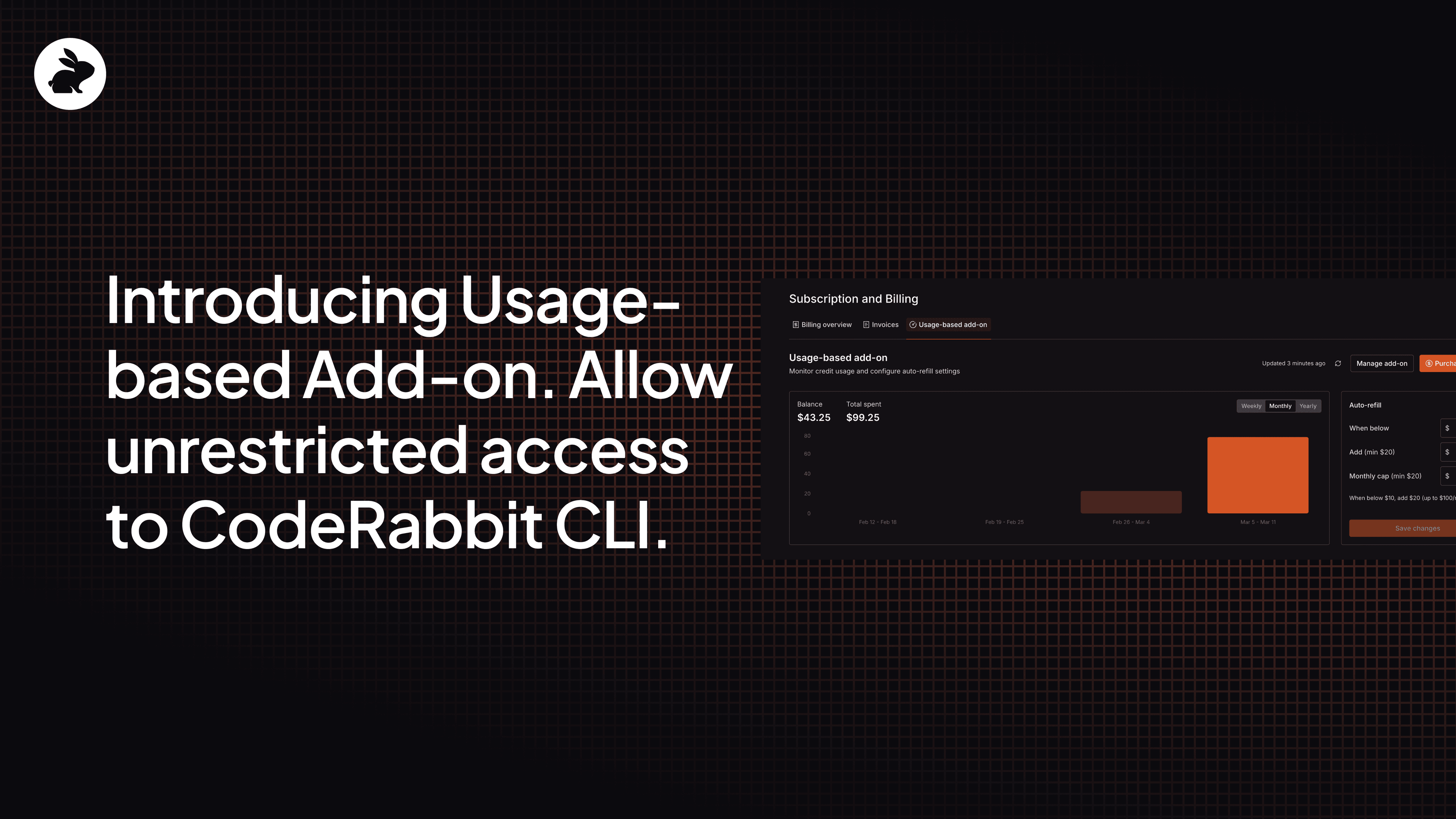
Once you start using your credits, you’ll want to know where you stand. The Usage-Based Add-On tab gives you real-time visibility into your credit spend, showing your current balance alongside a spending chart.

Credits are simple: $1 gets you one credit, and each reviewed file costs $0.25.

Getting Started

Here’s a step-by-step setup guide:

  • Install CodeRabbit CLI

    • Follow the instructions here or simply run this command in your terminal and follow along.
curl -fsSL https://cli.coderabbit.ai/install.sh | sh
  • Choose your purchase method

    • Head to Account Settings in the CodeRabbit web interface and find Subscription and Billing. You’ll see the Usage-based add-on tab there, where you can choose between a monthly subscription, a one-time purchase or auto-refill.
  • Create an Agentic API Key

    • Once your purchase is complete, navigate to the API Keys section and generate your Agentic API key.
  • Run CodeRabbit via your AI Agent

    • Prompt your agent to run a CodeRabbit CLI code review using the following command:
coderabbit –plain --api-key cr-***********
  • To avoid passing the key on every command, prompt your agent to authenticate once with your CodeRabbit API key using the following command:
coderabbit auth login --api-key cr-************

After logging in, prompt your agent to run a CodeRabbit CLI review without passing the API key again:

coderabbit review --plain

Give it a try

https://youtu.be/bMItn3G_upQ?si=D5mJu_tFUzXM7N7N

Ready to have unlimited CLI reviews? Head to the CodeRabbit web interface and grab some credits. Whether you go with a one-time purchase or set up a monthly subscription, you'll be up and running in minutes.

And if you run into anything or have feedback, let us know. We're building this for you.