



Brandon Gubitosa
May 11, 2026
9 min read
May 11, 2026
9 min read
Share


Cut code review time & bugs by 50%
Most installed AI app on GitHub and GitLab
Free 14-day trial
One of the most pressing questions engineering teams face right now is whether building a custom AI coding agent actually makes sense, or whether an existing tool already does the job. As agentic SDLC adoption grows, tools like Claude Code, Codex CLI, and Cursor cover a wide range of coding workflows, and building your own adds real maintenance cost on top of the initial engineering effort.
But there are cases where existing tools fall short. Compliance requirements, internal frameworks, custom guardrails, and workflows that generic agents do not expose are all reasons teams end up building their own. The further your agentic SDLC diverges from standard workflows, the more likely an off-the-shelf tool hits its limits.
This article walks through how to make that call, and how to build one when it is the right move.
Before building a custom agent, look at whether your workflow needs one at all. The two sections below walk through when building makes sense and when an existing tool is the better choice.
Many existing tools add system prompts, retrieval results, and logic behind the scenes that you cannot view or change. If your workflow requires precise control over context, building your own AI agent is the best option.
Healthcare, finance, government, and teams that must follow GDPR or the EU AI Act cannot send code to third-party cloud services. In these cases, self-hosted custom agents may be the only way to meet audit and data-residency requirements.
If you use internal frameworks the AI models were not trained on, custom DSLs, unique monorepo setups, or generated code that requires special retrieval, generic agents may not work well.
This can include custom approval steps for your review process, coordination between multiple agents that match your team's structure, audit trails for compliance, or write restrictions on certain parts of your codebase.
Existing coding agents cover most of the work that teams ask custom agents to take on:
Writing tests
Implementing scoped tickets
Fixing bugs
Refactoring across files
Building custom infrastructure for problems that are already solved adds maintenance without adding capability. Existing tools work well here because they're well-scoped, behave predictably enough for agents to reason about, and have been tested against real-world cases.
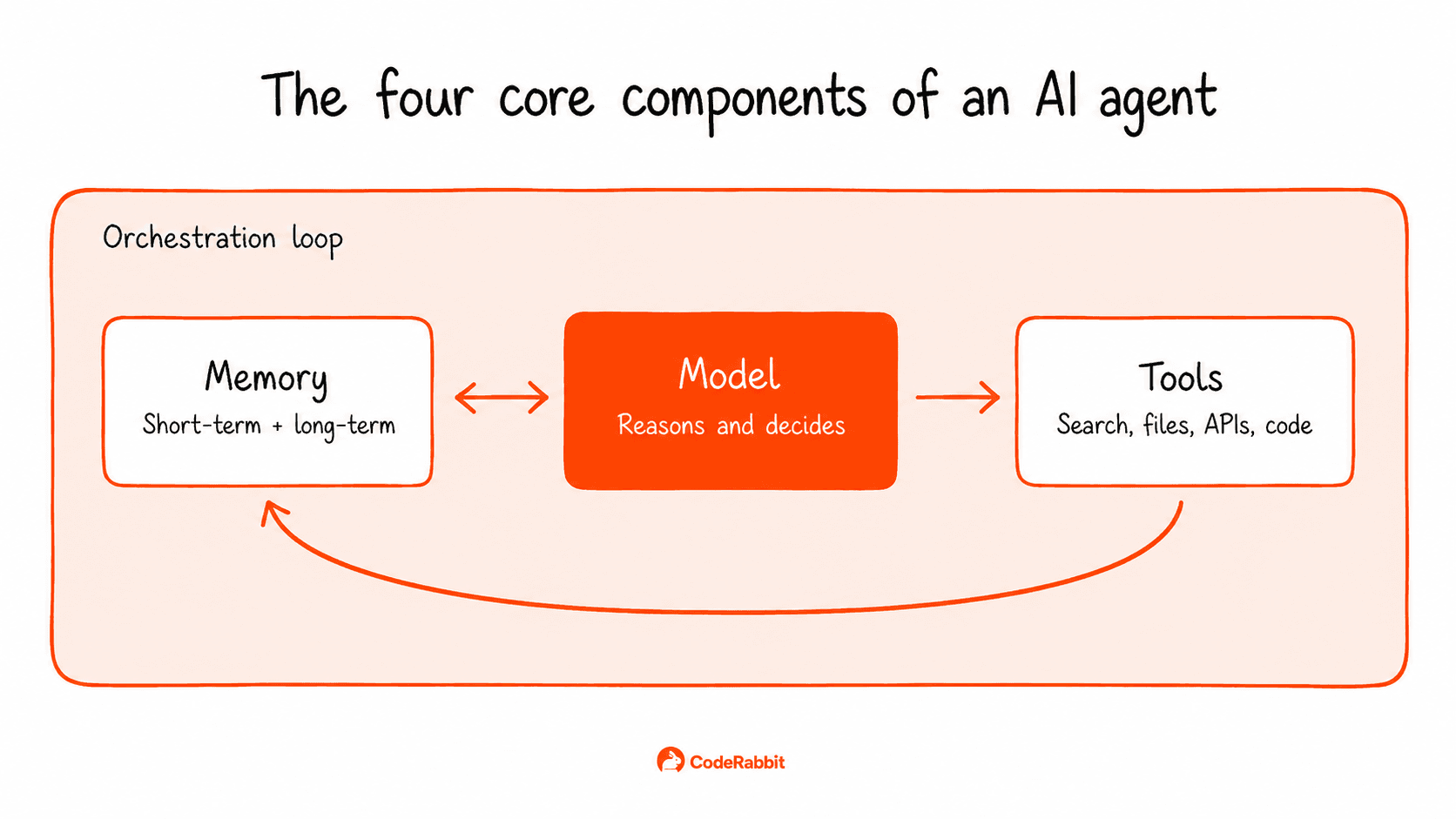
Every AI agent consists of four parts: a model, tools, memory, and an orchestration loop.
The model: The LLM that reasons about each step and selects the next action.
Tools: Functions the model can call to perform actions outside its own context. Common examples include web search, file operations, database queries, API calls, and code execution. Each tool needs a clear description so the model knows when to use it.
Memory: Memory management shapes an agent's performance over time. Short-term memory is the conversation context inside the model's window. Long-term memory lives in a vector database or persistent store and gets retrieved when relevant. Retrieval typically uses embedding-based similarity search. The agent's current context is converted to an embedding and matched against stored entries, with the closest matches surfaced as relevant.
The orchestration loop: The cycle that runs until the goal is met or a stop condition fires. The model picks an action, the action runs, the result feeds back into the model's context, and the model picks again. One well-known approach is ReAct (Reasoning + Acting), which structures the loop so the model alternates between generating reasoning traces and calling tools, using each output to decide the next step.
The three options below differ in how much you build versus how much comes pre-made.
AI agent frameworks: LangGraph, CrewAI, and PydanticAI give you pre-built patterns for the loop, tool use, and memory, with most of the integration code already written. These are the fastest ways to build a working prototype and come with thorough documentation. Other low-code tools, such as n8n, are well-suited for non-technical users who want to build agents with visual workflows.
AI agent platforms: Hosted, managed environments where you configure the agent rather than building it from scratch. The platform handles deployment, scaling, and monitoring, so you can focus on prompts, tools, and policies. This option works well for teams that want to launch quickly and avoid managing AI agent infrastructure.
From scratch: Direct API calls to AI models and your own orchestration code. This gives you the most control without any framework limitations, but it also requires the most upfront engineering effort.
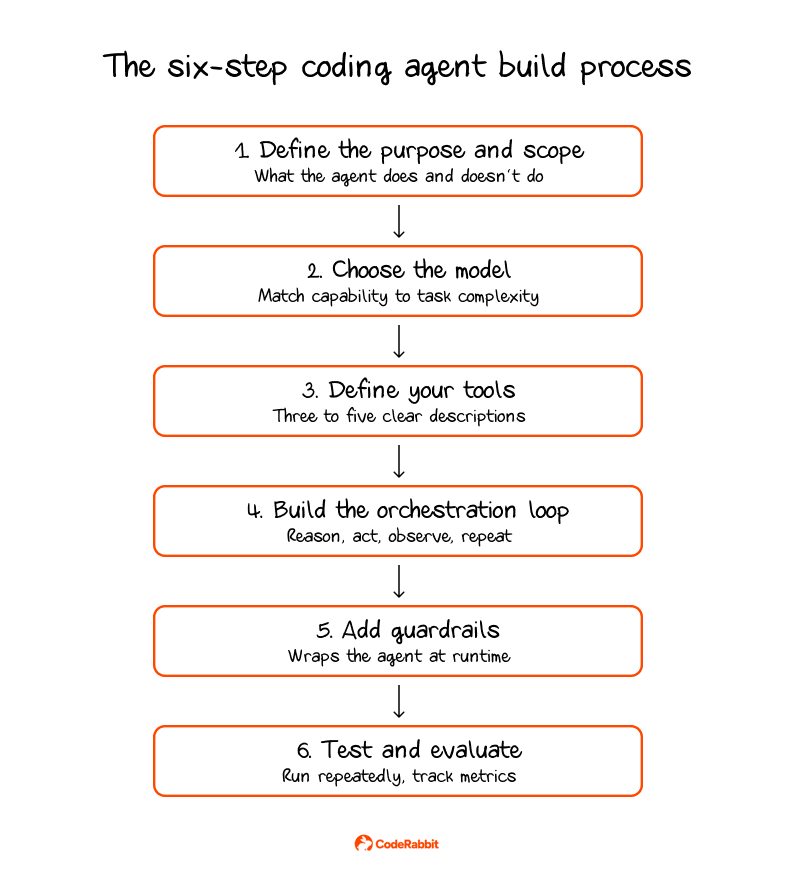
Once you've decided to build, the process can be broken into six steps.
Define the purpose and scope: Scope creep often causes AI agent development projects to fail, so decide what the agent should do, what it should not do, and how you will measure success before you start coding. For example, a clear job might be "write tests for the API layer" or "fix bugs in the payments module." If the goal is too vague, like "help with coding," the agent can start to drift.
Choose your model: Begin with a top-tier model to set a baseline for accuracy, then test smaller models on specific tasks to see if they still perform well. Fine-tuning a smaller model on your codebase is also an option once you have data on which tasks it handles well and where it falls short.
Define your tools: Begin with three to five tools and add more only if necessary. If you use more than 10-15 tools, especially ones with similar descriptions, the model can get confused. Give each tool a clear name, a short description, well-defined parameters, and a stable interface so the model can choose the right one every time.
Build the orchestration loop: The model chooses an action, the action runs, and the result feeds back to the model. This continues until the task is finished. Set clear stopping rules, including a maximum number of steps, success criteria, error thresholds, and a strict token budget. Without these, agents might keep running on tasks they can't finish.
Add guardrails: Limit how many times each tool can be used per task, and list the allowed actions. Decide which files the agent can write to, which APIs it can call, which commands it can run, and which paths are off-limits. For high-impact actions like merging to main, changing production databases, sending external emails, or anything that costs money, always require human approval.
Test and evaluate: Create a set of sample tasks with clear expected results. Run each task several times because agents behave non-deterministically. Track task completion rate, result accuracy, cost, and time per task
Two things change when coding agents ship code into a repo. First, the volume of code generated increases, which also increases the likelihood of low quality code entering production.
Starting with volume, AI-generated code now accounts for a large share of commits in public repositories. SemiAnalysis reported that Claude Code was authoring around 4% of all public commits on GitHub, with growth projected to push that figure past 20% by the end of 2026. Developers using AI tools open pull requests two to three times faster, but review queues are falling behind. Every line an agent writes needs to be reviewed, and at this scale, manual review just can't keep up.
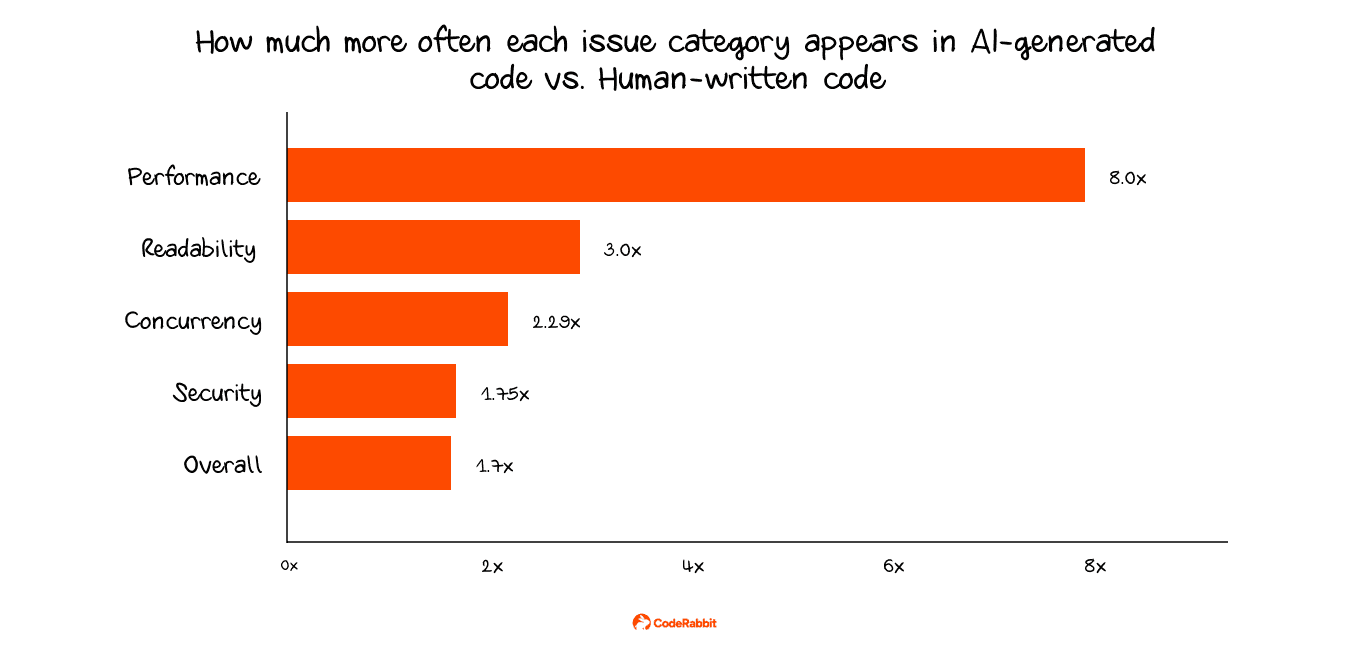
The other big change is the defect rate. According to a report that analyzed 470 open-source pull requests, AI-generated pull requests had 1.7 times as many issues per change. Logic and correctness mistakes were 1.75 times more common, security problems happened 1.5 to 2 times more often, and concurrency issues were 2.29 times more frequent.
Most human reviewers do not spot these defects right away. AI-generated code usually compiles, runs, and passes basic checks. However, deeper problems can still exist, such as business logic that appears correct but yields the wrong result, configuration mistakes that surface only under heavy use, exception handling that masks important errors, and new dependencies that have not been properly vetted.
Teams that use agents without a review step face a growing quality problem as agents get faster. To fix this, every pull request should undergo automated review before a human reviews it.
AI code review tools like CodeRabbit run an independent review on every pull request. CodeRabbit is the AI-native quality gate that helps you move fast without losing control. It provides instant explainability for every change and enforces consistent standards across every PR, so what ships matches what you intended.
Deciding whether to build a custom AI coding agent takes careful thought. If tools like Claude Code, Codex CLI, Cursor, or other background agents already fit your agentic SDLC, building your own adds maintenance without adding much. The decision comes down to how specific your needs actually are.
What does not change either way is the review problem. An agent that writes code will always produce more diffs than your team can manually inspect, and how you handle that review process determines whether you actually hold onto the speed gains. Teams that close that gap with automated review, like CodeRabbit, are the ones that keep the velocity without letting quality slip.


