
CodeRabbit logoCodeRabbit logo
AgentEnterpriseCustomersPricingBlog
Resources
  • Docs
  • Trust Center
  • Contact Us
  • FAQ
  • Reports & Guides
Log InGet a free trial
CodeRabbit logoCodeRabbit logo

Products

AgentPull Request ReviewsIDE ReviewsCLI ReviewsPlanOSS

Navigation

About UsFeaturesFAQSystem StatusCareersDPAStartup ProgramVulnerability Disclosure

Resources

BlogDocsChangelogCase StudiesTrust CenterBrand GuidelinesReports & Guides

Contact

SupportSalesPricingPartnerships

By signing up you agree to our Terms of Use and authorize CodeRabbit to provide occasional updates about products and solutions. You understand that you can opt out at any time and that your data will be handled in accordance with CodeRabbit Privacy Policy

discord iconx iconlinkedin iconrss icon
footer-logo shape
Terms of Service Privacy Policy

CodeRabbit, Inc. © 2026

CodeRabbit logoCodeRabbit logo

Products

AgentPull Request ReviewsIDE ReviewsCLI ReviewsPlanOSS

Navigation

About UsFeaturesFAQSystem StatusCareersDPAStartup ProgramVulnerability Disclosure

Resources

BlogDocsChangelogCase StudiesTrust CenterBrand GuidelinesReports & Guides

Contact

SupportSalesPricingPartnerships

By signing up you agree to our Terms of Use and authorize CodeRabbit to provide occasional updates about products and solutions. You understand that you can opt out at any time and that your data will be handled in accordance with CodeRabbit Privacy Policy

discord iconx iconlinkedin iconrss icon

What is agentic coding? A practical guide for developers

by
Brandon Gubitosa

Brandon Gubitosa

May 15, 2026

9 min read

May 15, 2026

9 min read

  • What is a coding agent?
  • How agentic coding differs from AI-assisted coding
  • Agentic coding vs. vibe coding vs. agentic engineering
  • How the agentic coding workflow works with minimal human intervention
  • What agentic coding means for your software development team
  • Best practices for agentic coding workflows
  • The quality question agentic coding raises
  • Wrapping up
Back to guides
Cover image

Share

https://victorious-bubble-f69a016683.media.strapiapp.com/Reddit_feecae8a6d.pnghttps://victorious-bubble-f69a016683.media.strapiapp.com/X_721afca608.pnghttps://victorious-bubble-f69a016683.media.strapiapp.com/Linked_In_a3d8c65f20.png

Cut code review time & bugs by 50%

Most installed AI app on GitHub and GitLab

Free 14-day trial

Get Started
CR_Flexibility.

Frequently asked questions

What distinguishes agentic coding from using AI coding assistants?

AI coding assistants help you as you type, suggesting the next line of code or answering questions while you work. Agents, on the other hand, take over the task completely. You give them a job, and they handle it step by step, then return a finished change for you to review.

How do coding agents impact code review and merge-request workflows?

Agent output comes in as a pull request, just like any other change, but usually at a higher volume and with different types of errors. AI-generated pull requests have about 1.7 times more issues than those written by humans. If teams don't adjust their review process, they risk releasing problems faster than they can catch them.

What is the difference between agentic coding and vibe coding?

Vibe coding is quick and flexible, good for prototypes where trying things out is more important than structure. Agentic coding is more careful: you define the task, set the rules, and review the output before merging. This makes it better for production work.

What tools support agentic coding?

Agentic coding tools fit into three main groups: CLI tools like Claude Code, IDE-integrated AI coding agents, and autonomous agents that run in the cloud. CLI tools work in your terminal and can handle complex workflows from start to finish. IDE-integrated agents help you as you write code. Autonomous agents handle bigger tasks with little human input.

Catch the latest, right in your inbox.

Add us your feed.RSS feed icon
newsletter decoration

Catch the latest, right in your inbox.

Add us your feed.RSS feed icon

Keep reading

How to build an AI coding agent (and when not to)

How to build an AI coding agent (and when not to)

The hard part of building an AI coding agent isn't the loop or the tools. It's knowing when not to build one, and what breaks once it starts shipping code.

Agentic SDLC: How AI agents are changing every phase of software development

Agentic SDLC: How AI agents are changing every phase of software development

What agentic SDLC actually means, how it differs from AI-assisted development, why code review is now the critical bottleneck, and what a well-structured agentic stack looks like.

Get
Started in
2 clicks.

No credit card needed

Your browser does not support the video.
Install in VS Code
Your browser does not support the video.

Agentic coding used to be just a buzzword, but now it’s become the standard way many engineering teams work. Even so, there’s no clear agreement on what it really means. For some, it’s just a more advanced autocomplete. For others, it’s about AI agents that can deliver production code on their own.

In practice, agentic coding changes how teams work. Instead of using AI as a helper, developers can now hand off more tasks to it directly. This lets developers spend more time on big-picture design while the AI handles the details. You give the AI instructions in plain language, and it plans, completes the steps, and creates a pull request for you to review.

This speeds up work, but teams are shipping more code than they can properly review. AI-generated code tends to have more issues than code written by humans. If teams move quickly without updating their review process, they build up quality debt that will cause problems down the line.

This article explores how agentic coding differs from other AI-assisted approaches, traces the full workflow from task assignment to human review, and explains where quality debt comes from and how to close it before it ships.

What is a coding agent?

A coding agent is autonomous software that runs on an AI model and handles end-to-end development tasks. The agent breaks complex workflows into smaller subtasks, calls tools like file systems and shell commands as needed, and runs through the steps with minimal human intervention. Many coding agents use ReAct or similar prompting strategies internally to decide on the next action.

Most coding agents live inside the IDE or run against your pull requests. An agentic coding tool sits between you and the codebase, taking a goal and doing the work without needing your input on every step.

How agentic coding differs from AI-assisted coding

AI-assisted coding helps you write code, but agentic coding does the coding for you.

With tools like autocomplete or inline chat, you stay at the keyboard. You might type a function name and let the AI fill in the body, or ask a question and get an answer. The work is still yours, the AI just helps you do it faster.

Agentic coding is different. You give the agent a task, such as "add rate limiting to the login endpoint." The agent then handles the work independently. It reads the relevant files in your codebase, writes the code, runs the tests, and fixes any issues until it produces a finished change for you to review.

Agentic coding vs. vibe coding vs. agentic engineering

People often use these three terms interchangeably, sometimes even in the same discussion. They actually describe different levels of structure in AI-assisted development.

Vibe coding is the most relaxed approach. You explain what you want in simple terms, the AI creates something similar, and you keep tweaking it until it works. This method is good for prototypes, demos, and quick projects, but not ideal for production-level work.

Agentic coding is more structured. The AI still does most of the work, but you set clear rules, define the task, and check the results before accepting them. You can test the output, and the AI works within the limits you set.

Agentic engineering takes things a step further. Here, you apply the same engineering discipline to your agent systems as you do to other production infrastructure. This includes observability, testing, version control, and deployment practices that match your team's usual standards.

Instead of seeing these as competing methods, think of them as steps on a maturity curve. Most teams progress through them as they learn how AI fits into their workflow.
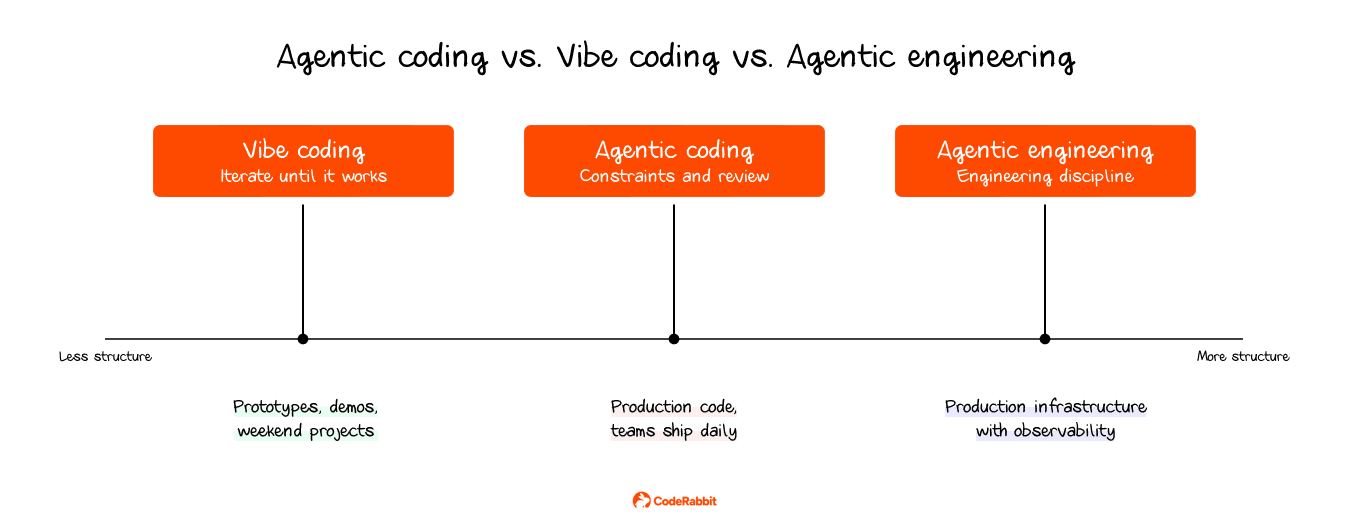
A diagram comparing Vibe coding, Agentic coding, and Agentic engineering on a structure spectrum.

How the agentic coding workflow works with minimal human intervention

The agentic coding loop runs in five phases:
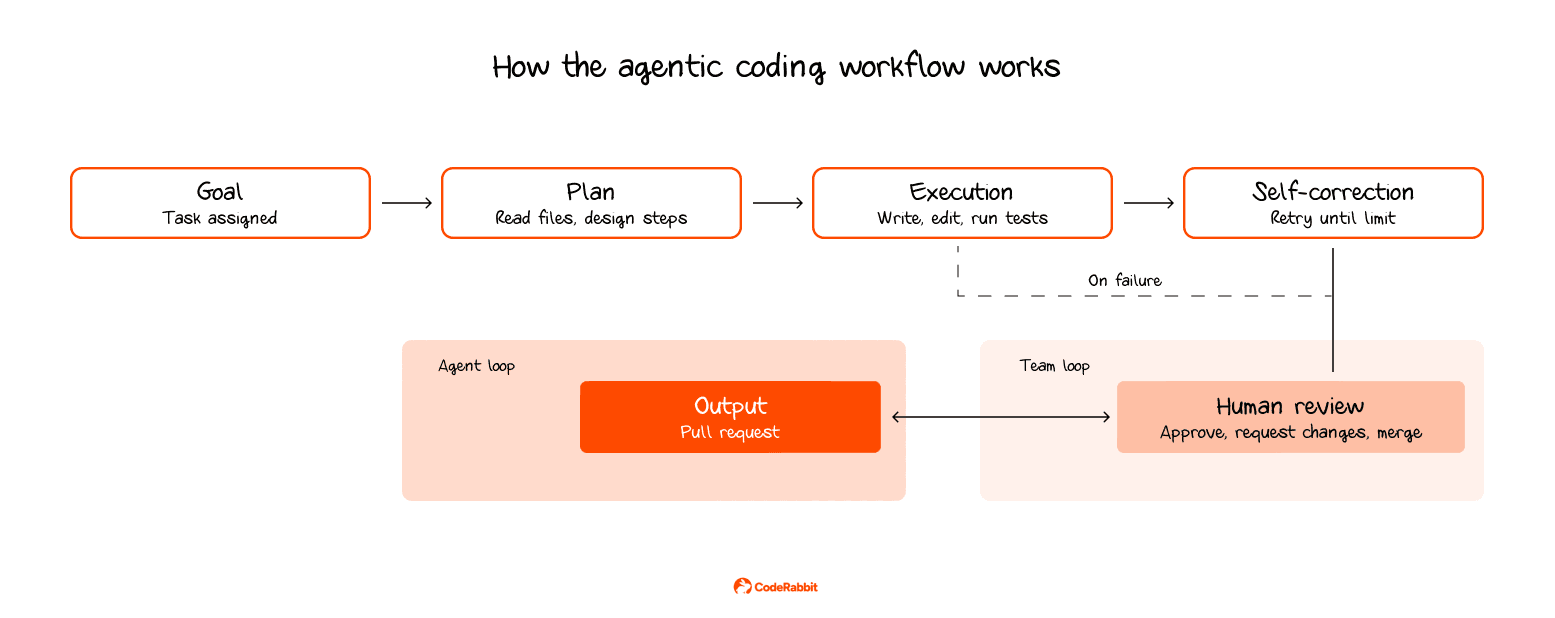
  1. Goal: You give the agent a task with enough context to act on. Something like "add pagination to the user search endpoint" or "fix the failing tests in the billing module."
  2. Plan: The AI agent reads the relevant files, figures out what needs to change, and decides on an approach.
  3. Execution: The AI coding agent can write new files, update existing code, run terminal commands, and perform tests. It also makes changes across several files when needed. The agent does not always follow a strict step-by-step process. Instead, it switches between writing and testing as needed.
  4. Self-correction: If something fails, the agent checks the error, updates the code, and reruns the tests. This cycle repeats until the tests pass or the retry limit is reached. In most production systems, retries are capped, or a token budget is set to prevent the agent from wasting resources on problems it cannot solve.
  5. Output: The result arrives as a pull request with code and tests, sometimes including a summary of what changed.

Flowchart illustrating the agentic coding workflow: Goal, Plan, Execution, Self-correction, Output, Human review.

Once the agent finishes its work, the process continues. A person still needs to review the output and decide whether to merge it. While the agent can fix issues found by tests and compilers, it cannot catch problems related to your codebase’s style or subtle logic errors that tests might miss but could cause issues in production. This is why agentic code review is an important part of the workflow.

What agentic coding means for your software development team

You’ll see the most benefit on well-defined tasks where AI coding tools can follow clear instructions and finish the work without much back-and-forth. Tasks such as migrations, refactoring, setting up new modules, and adding test coverage to existing code are all things an agent can handle with minimal oversight.

You also save time because you don’t have to keep switching between tasks. You can hand off the work, focus on something else, and return to find the change completed.

The trade-off is that your role changes. Instead of writing code, you’ll spend more time clearly defining tasks and reviewing what the agent produces. If teams skip the review step, they risk shipping defects introduced by the agent.

Best practices for agentic coding workflows

Coding agents work well when your team's processes keep up with them. Three areas matter most.

  1. Governance and scope control: Treat the AI coding agent as a contractor with access to the codebase. Only give it the access needed for each task. Use strict rules to keep unapproved packages out, and always require a human to approve changes before merging. This helps to contain the impact if something goes wrong.
  2. Oversight and integration: Ensure every pull request from the agent undergoes your usual code review. Skipping reviews, even for small changes, can let subtle bugs reach production. Keep track of what the agent is doing in your codebase so you know what it has shipped. Adding an automated review step before a human review can help catch issues early.
  3. Testing and assurance: Test agent-generated code, just like you would test code written by a developer. Use static analysis and dynamic testing, and add extra security checks for important changes. Agents make different kinds of mistakes than humans, such as insecure logic, unapproved dependencies, or broad error handling, so make sure your tests are set up to catch these issues.

The quality question agentic coding raises

The benefits of agentic coding depend on how well your review process can keep up. As noted earlier, AI-generated code tends to have different types of bugs than human-written code, and these bugs appear more often.

Our 2025 report looked at 470 open-source pull requests and found that AI-generated PRs have about 1.7 times as many issues as those written by humans. The types of issues vary. Performance problems are nearly 8 times as common, code readability issues are more than 3 times as frequent, security vulnerabilities are 1.5 to 2 times as common, and concurrency bugs are 2.29 times as likely.
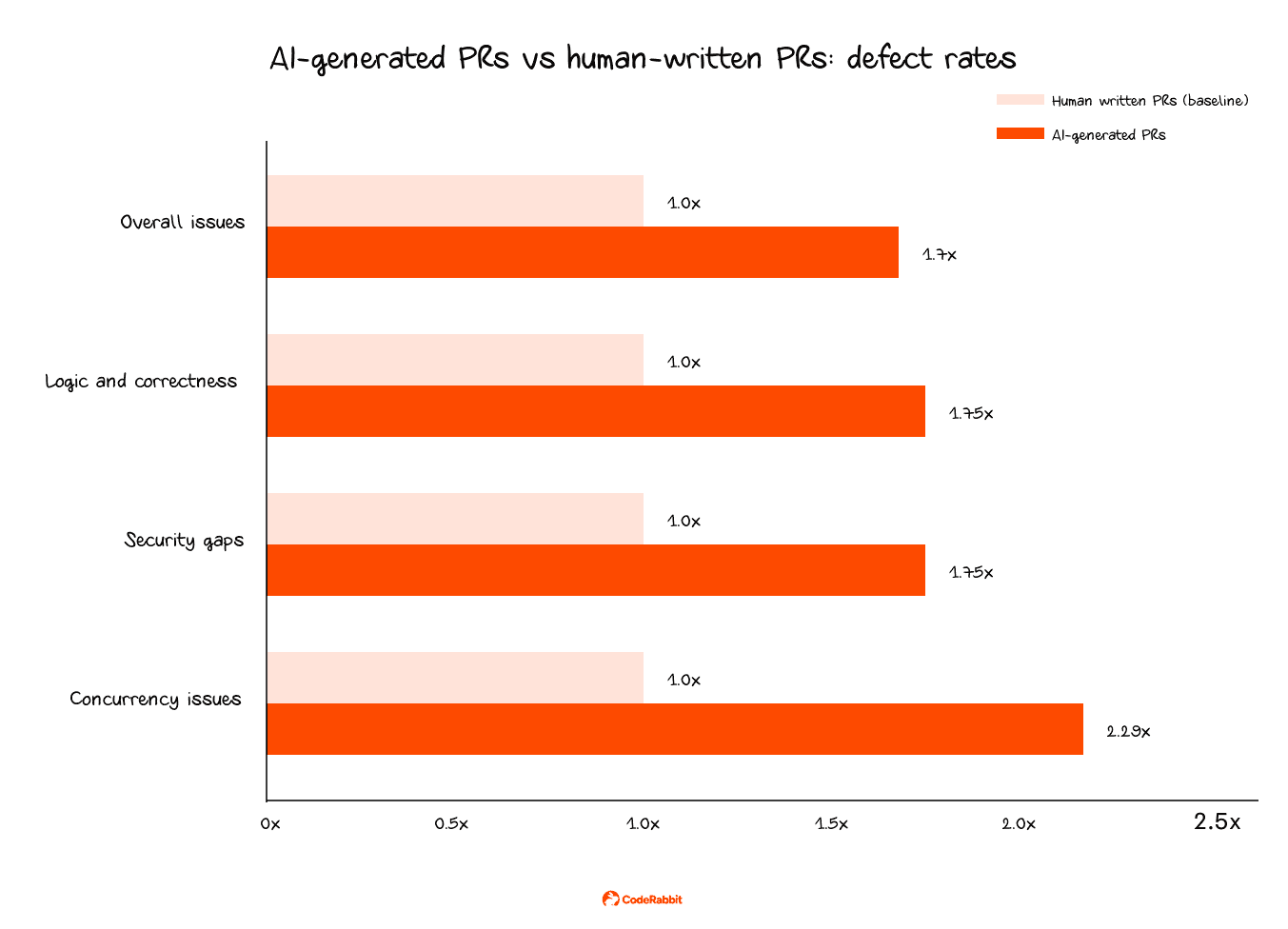
Bar chart shows AI-generated pull requests have higher defect rates than human-written.

The problem gets worse with volume. Many teams now see two to three times more pull requests after adopting AI coding tools, but their ability to review code has not increased at the same rate.

AI-generated code usually passes the basic checks. It compiles, runs, and gets through most surface-level reviews. However, the real problems are harder to spot: business logic that seems correct but gives wrong results, configuration errors, error handling that misses the right exceptions, and dependencies added without enough review.

Teams that use agentic coding but do not improve their review process are building up quality debt that will cause problems in the future. To fix this, teams need a review process that grows with the amount of code being generated. One way to do this is to add an automated code review step before a human reviews the code.

AI code review tools like CodeRabbit run an independent review on every pull request. CodeRabbit is the AI-native quality gate that helps you move fast without losing control. It provides instant explainability for every change and enforces consistent standards across every PR, so what ships matches what you intended.

Wrapping up

Agentic coding changes how development teams work. Instead of writing every line of code, you assign tasks and let the agent handle the process. This speeds up some kinds of work, but the process runs longer than teams expect because the agent stops working once it finishes generating code, while the team's job continues until someone reviews the output and decides whether to merge. Understanding the full loop, from task assignment through generation to review, is what lets a team adopt agentic coding without accumulating hidden quality debt.